The Time Inside a JPEG
A photo can contain a capture time, while the file system keeps a different time and an export creates another. Before sorting an archive, find out which clock each value came from.
In this story 5 sections
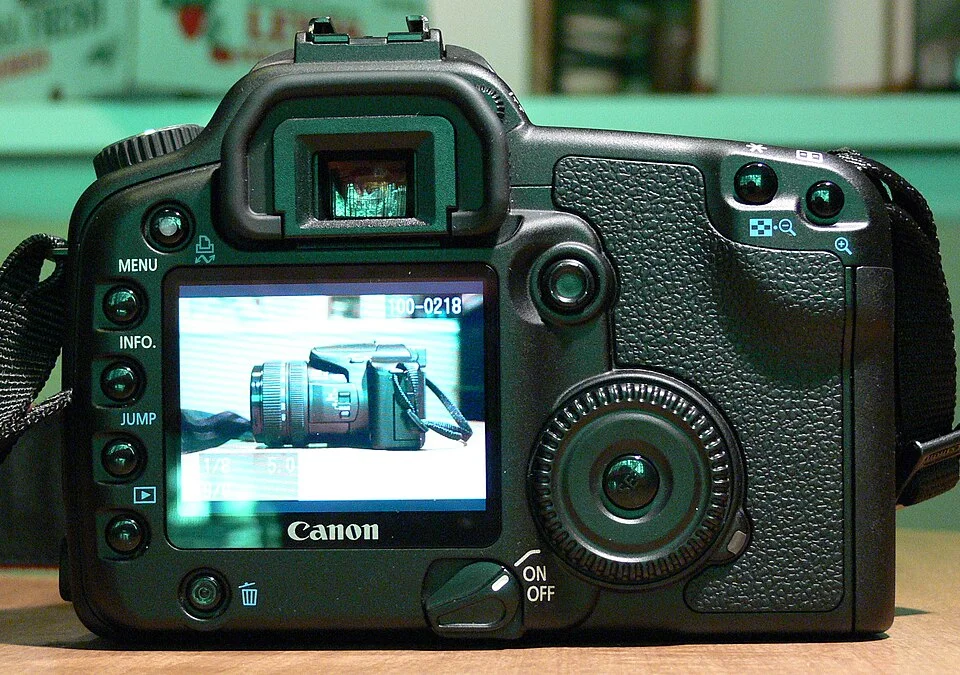
There is a picture of a camera on the screen of the camera in Scaredpoet’s photograph. The display lights up the back of a Canon EOS 30D, so it is easy to see that the machine has a way to call back something it recorded. View the finished JPEG on another device and the screen that originally displayed it no longer matters. The file can carry information of its own alongside the visible image. Time is one of the most familiar details to keep, and one of the easiest to interpret too quickly.
A folder might show a date that seems completely clear. Click on the image and an application gives a different one. Move it onto a newer computer and a third appears. The information does not necessarily disagree about the same event. Some of it is about a moment the camera tried to record. Other parts can be about the life of the file in a particular storage system. An exporter may create another object with its own history. Working out which of these a display is reporting usually resolves more puzzles than deciding that one application owns the correct clock.
Start with what the image can carry
Exif provides a way to include descriptions and technical details in image files. The specification for digital still cameras includes fields for time associated with original image generation and for digitization. A file can also have a time associated with changes to the image data. The field commonly read as the capture date is named DateTimeOriginal. A name alone does not ensure a field is present, was entered correctly or survived editing. It tells a program which kind of date a writer was trying to supply.
In a JPEG, metadata travels in a part of the file separate from the compressed image representation. A reader can decode a perfectly recognizable picture when a timestamp is missing; the clock did not have to determine the color of a pixel. This matters in the opposite direction too. Editing a time value does not cause the camera to go back to the moment of recording. It changes a claim stored with the image. Comparing two files visually cannot establish whether their sets of descriptive data are the same, any more than two prints that look alike must have been labelled on the same afternoon.
Think about a photograph made by a camera and a print of an older photograph digitized on a scanner. The first activity can involve image capture and digital encoding nearly together. The second involves an old scene and a much later act of producing a digital file. If the instrument reports a date for digitization, it does not date the people or objects in the older picture. A family archive can keep the dates separate. It might use an estimated date in a descriptive note for the scene itself and preserve the exact date of scanning as a fact about the digital copy.
A clock reading isn't always a position on the world clock
Suppose two photographers record images at a fictional gathering. Their cameras both display 09:30. One camera wrote the time with a UTC offset of plus two hours. The other saved no offset. The first can be interpreted as 07:30 UTC on the relevant date, assuming the clock and offset were set correctly. The second gives a local-looking time but leaves the relation to UTC undetermined. For a set of images acquired together one could infer they were using the same local clock on the strength of other evidence. Seeing the same digits isn't enough by itself.
The Exif specification defines an OffsetTimeOriginal field to supplement the original date and time when that information is recorded. A reader should look for the offset associated with the field it is using, rather than grabbing a different offset elsewhere in the file. Travel makes this issue easy to see. A photographer could leave the camera set to the offset used at home. A picture taken under daylight at the destination could then receive a local time that would normally be associated with darkness there. The camera can faithfully record its own settings and still give the archive something to clarify.
Some applications display the value as it was written. Others can convert a date into the timezone configured on a viewing device when the necessary information is available. The two displays can look hours apart and still describe the same instant. A clock near midnight can display a different date after conversion. For shared archives it helps to keep written offsets and not normalize a collection silently by treating every date without an offset as if it belonged to the same known time zone.
Copying, editing and exporting give the file its own dates
At a file system level, dates can refer to when a file was created in a location or modified there. Applications and devices may preserve or change attributes as files are copied and moved. An export intended for sharing can create a new file with a recent date while copying the camera's capture date. An export that omits metadata can leave nothing inside the new JPEG to say where it came from. Neither action needs to change the visible time of day in the picture. Both affect what can reasonably be learned from the output object.
The page for the cover photograph offers a useful concrete distinction. Wikimedia Commons lists a date in its file description and separately displays technical fields for the uploaded photograph. The description's date and the date shown in those fields differ. That is not a sufficient basis to settle the true moment of the exposure or diagnose why the values disagree. It is a good reason to cite which field one has read. The significance comes from the two kinds of records, not from the make of the pictured camera or an assumption about what that camera wrote.
There can also be multiple file-system dates at one point. The operating system might show when the current object appeared in a folder and when its data last changed. Which meaning is attached to a name can vary by system. If photographs are being sorted into an archive, do not trust the label date by itself. Ask whether the application is using metadata embedded in the image, a file attribute or a value chosen when an import database was built.
Preserve the distinction when making changes
An archive made for ordinary use does not need to declare which time wins in every case. It can keep the original files and write any interpretation in a separate record. A person sorting a small group taken on one trip may know from a clock photographed during the trip that a camera was an hour slow. That evidence could help describe a correction. It does not require inventing a subsecond time for images that were never recorded with one. A concise note about what established the difference can be more useful later than a bare set of adjusted numbers.
Sharing a photo is another occasion to be deliberate. Additional descriptive fields can disclose dates and sometimes information such as location when that was recorded. A person preparing their own image for public sharing can choose which useful data to keep with the copy. Checking the actual export is more informative than assuming that all applications include or remove the same fields. A version for display can be prepared differently from an archive copy, when what matters to the viewer differs from what the owner wants to save. A photo that looks the same on screen can meet both needs through two separate files.
Keep a second sort key when order matters more than precision. A camera numbered its original images in a meaningful sequence on that occasion, perhaps, or a collection records which day and session each image belongs to. A sequence can preserve an order even where two files have identical times to the available precision. It does not create evidence for time recorded by a camera that never supplied it. Once the two kinds of information are kept apart they can support each other.
Dates can have different precision even before somebody sorts them. A field recording seconds and an annotation saying only that the picture was taken in May cannot be made equivalent by adding zeros at the end. Store the annotation for what it says. A search that accepts the whole month may be more faithful to the evidence than requiring a fictitious exact day so that every image has the same kind of row.
Ask which event the number names
The display on the pictured camera tells us that an image can outlast the click of a shutter. It cannot say how later software will label this particular record. Some of the details that make a photograph easy to use in several contexts are precisely the ones invisible in the picture. Look at the archive with that difference in mind. Use capture information when the question concerns when the photograph was made, file information when the question concerns what was done to this copy, and descriptive information when another person has explained something the data could not establish on their own.
A date becomes considerably less mysterious once the event attached to it is made explicit. The camera clock, the moment a file was copied and the date a catalogue was written all belong in the life of a photograph. They do not have to be compressed into one value before that life can be understood.