The Short Gap a UPS Covers
A battery backup handles the interval between a failing outlet and a device that needs more time. Its power rating, transfer behavior and runtime describe different parts of the result.
In this story 6 sections
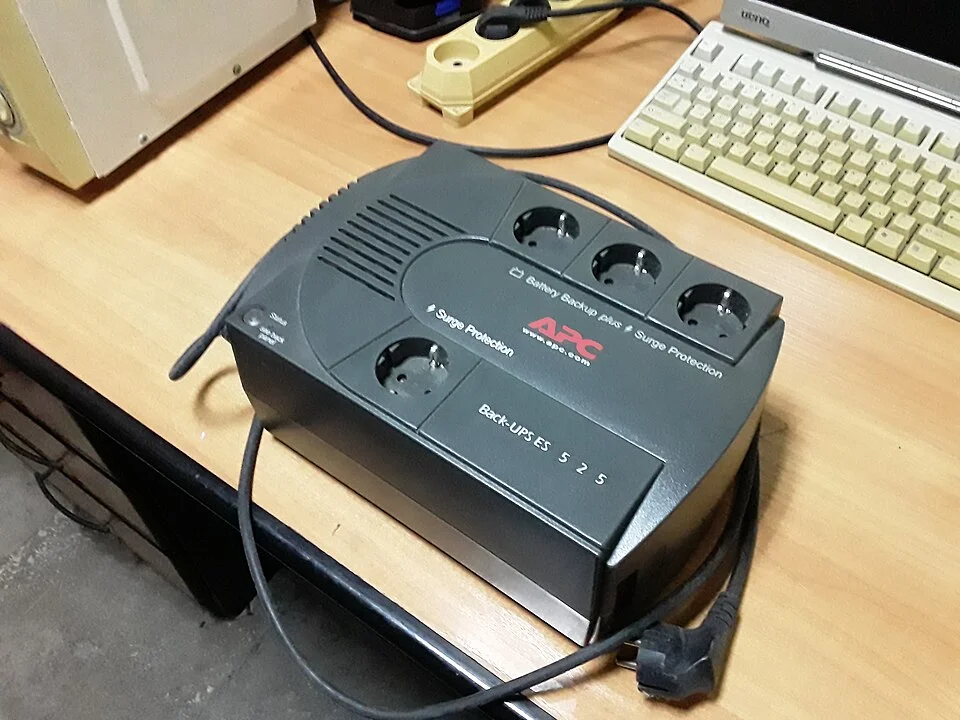
A battery backup can look like a particularly large group of sockets. The housing in MSDN.WhiteKnight’s photo is of an APC Back-UPS. When one is used at a desk, the ordinary first sight of it could be a few cords disappearing into the case. On a day when power is behaving normally, the person at the desk might never notice what happens inside. Then the supply falters. A lamp on another outlet goes dark. A device connected to a suitably configured backup could stay on long enough for its user to finish a small task or shut it down.
The abbreviation UPS stands for uninterruptible power supply. The name sounds as if it answers every question about this interval. In fact it describes a family of equipment which can cross from one source of energy to another with different arrangements. A useful account distinguishes two lengths of time. First there is the time it takes for backup power to become available in the relevant mode. Then there is the time for which it can continue to supply the connected load. One can be on the scale of a brief interruption that a device has to ride through. The other is the time a person might have to do something with the result.
Start with the path the power takes on a normal day
An ordinary standby design generally uses the incoming alternating current to supply its outlets intended for battery backup under normal conditions. Separately it can keep its battery charged. If it detects a condition requiring backup, it changes paths so stored energy can be used. A battery supplies direct current. An inverter supplies the alternating current the attached equipment is meant to receive from an AC outlet. Eaton’s overview describes a short transfer interval for this category. Precisely how a given unit switches and how the connected equipment reacts depend on their designs.
That gap can matter even though it is much shorter than the time for which a healthy battery will support the load. A computer supply may carry itself through a low interval of some duration. Another device could shut off during the same interval. A specification about transfer time is meaningful because the device cannot use minutes of promised runtime before the transition is over. Conversely, a device continuing through the first instant tells little about whether the unit can support the same load for the full period its owner expects.
A line-interactive design commonly adds the ability to correct some deviations in the supply without immediately drawing energy from the battery. In normal use, a low or high input and an actual loss of the supply can therefore lead to different behaviour. Knowing which kind of device is involved helps somebody distinguish an ordinary adjustment from an occasion when the backup really needed the battery. It is one reason two units called UPS can use different ways to get through the same disturbance.
Double conversion changes the first question
In a common online design, the path to the output ordinarily converts AC to DC and then uses an inverter to produce AC again. The battery is available on the DC side of that arrangement. As Eaton explains, this can let the inverter continue supplying the load on a loss of input without the same standby transfer. That addresses part of a narrow question about how power reaches the output. It doesn't manufacture more stored energy, and different operating modes or bypass arrangements can have their own behaviour. The text on the product and documentation matter when the details are needed.
The distinction is easier to reason about if the word online is read as a description of the power path instead of a promise about an internet connection. No data link makes a battery deliver more energy by itself. An optional connection to a computer might carry reports about the power event or tell software to start an orderly shutdown according to settings. That role belongs to monitoring and control. A computer can need both electricity and a message about what to do next, but the two do not have to come through the same connection.
Think of someone who wants a small network device to continue briefly. If some other device farther along the connection loses its own supply, keeping the one on the desk powered does not restore access to everything beyond it. A useful continuity plan describes which equipment has to stay available for the result to matter. That can expose a missing connection the first shopping list or test never considered.
Power is a ceiling and time is a budget
A UPS has limits on the amount of load it can support. Specifications can state both watts and volt-amperes. They are related and are not generally interchangeable values; both limits of a particular device may matter. An owner looking for runtime should also look for data at the expected load. A rating describing the maximum load a unit can support is not a statement that it will supply that load for a long interval. Battery condition, the design and how the unit is being used can change the time available.
Imagine a desk with an instrument that needs to save a reading and a screen needed to check it. When both are on backup, their demand together matters. The device at the same outlet that draws power but isn't needed could change how much time is left. A more useful question than how long the battery lasts is how long the tasks can remain supported under the ordinary load that will actually be attached. Batteries themselves can deliver a different result after service and age than they did when new, making occasional appropriate checks more useful than remembering an original figure.
Also read labels on the outlets. Some products include positions for battery backup and other positions offering a more limited function, such as surge protection alone. It is possible to plug something into the right-looking case and put it on the wrong part of the equipment for the intended job. The photograph of the unit identifies the physical object. Determining the role of a specific socket comes from its labels and documentation.
Ask what a few minutes need to buy
A studio computer might need time for someone to save a file, finish a transfer or allow a managed shutdown. A short-lived outage might pass before those steps are necessary. Someone planning for a longer absence needs to know when to reduce the work the equipment is doing, rather than returning to a stopped device and assuming that the battery ought to have held indefinitely. It is often possible to decide this before any failure, by looking at the devices involved and the circumstances in which they should shut down.
Do not ignore equipment beyond the device being saved. A display may be needed to reach a control someone normally uses. A storage system may have its own requirements for a safe stop. A critical device calls for an arrangement suited to its purpose, rather than an inference from a desk accessory. Even for ordinary home or small office work, a simple description of what has to happen during an outage can prevent the wrong parts of a setup from being prioritized.
Give the backup a useful check
The procedure supplied by a manufacturer can help somebody use the unit's own indicators or initiate the check provided for that model. This is separate from experimenting with unfamiliar power connections or interrupting equipment that is doing essential work. A check can be planned for a time when the connected devices are safe to stop if something is wrong. The people relying on the devices should know what result someone is trying to establish and whether an alert or shutdown might follow.
A light marked ready is a useful observation, but ask what the product says that light means. It might concern the presence of incoming power, the availability of a battery or an operating mode. An error message can likewise name a detected condition without identifying its entire cause. A useful maintenance note records the light or message, the circumstances in which it appeared and the work being done at the time. It avoids treating a battery indication as a measurement of runtime at an unspecified load.
Once incoming power is restored, allow for another difference between readiness and duration. The device may be able to power its ordinary outlets while stored energy is still being replenished. Two events close together can therefore give different results from two events weeks apart.
One unit, two kinds of evidence
Keep an example load and a time estimate with the model and battery information. If an outage produces a shorter interval than expected, ask whether the equipment actually moved onto backup, whether it supported the load and how long that lasted. The first failure could be about the transition or what was connected. A later stop could have a different explanation. That difference is worth preserving even before the equipment goes to someone for service.
The large housing in the picture is the most visible part of a modest agreement with what is plugged into it. The unit has to keep the first gap small enough for those devices. It then has to supply them for long enough to accomplish the chosen work. A good plan reads the two parts separately and gives the resulting minutes a purpose, instead of asking one battery rating to promise more than it can say.