The Board That Starts Before the Monitor
A desktop can be doing important work before there is anything to see on the screen. A light or small code on the motherboard can help establish which part of startup reached it.
In this story 6 sections
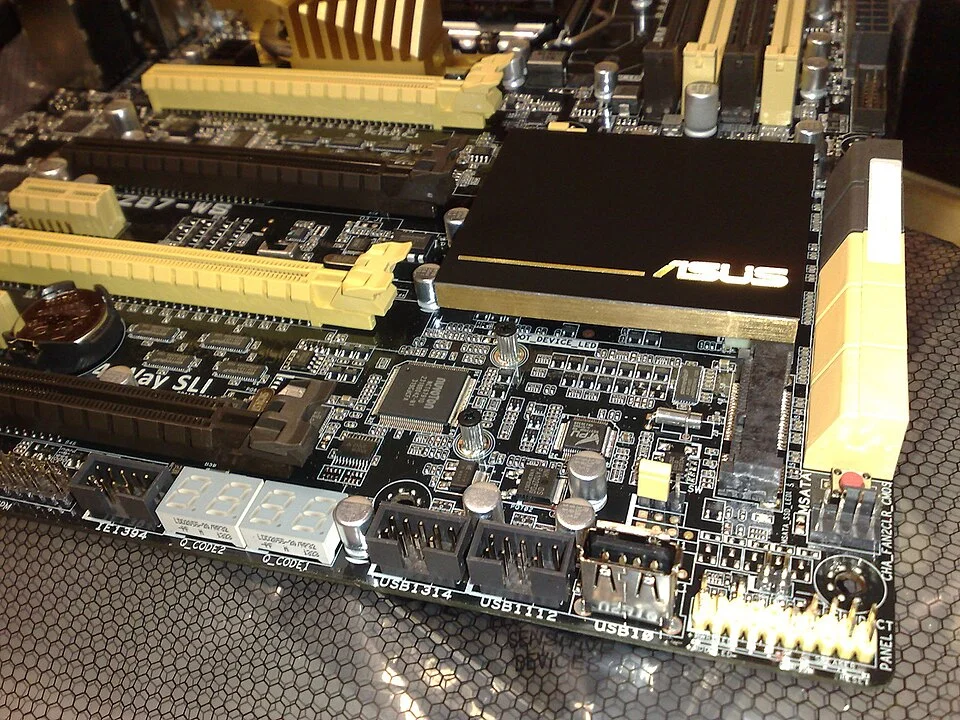
Two small displays are set directly into the circuit board in Dsimic’s photograph. The numbers on them are meant to be read from inside a desktop case, not from the monitor a person normally uses. The board in the photo is an ASUS model with two diagnostic displays. A design that puts a few digits on the board can tell its owner or a technician something about an early part of startup. That is precisely when the ordinary screen might not yet be ready to show anything.
It helps to distinguish three experiences that can all look like a blank screen: power never reached the relevant parts of a system; the machine started but reached a problem before it could initialize a useful display; or a display is unavailable even though the computer progressed much farther. The glowing digits, when a board provides them, are one way to obtain evidence without guessing from the darkness of the monitor. The evidence still needs to be matched with the particular board and with the moment in the attempt when it appeared.
Going from power to an operating system takes stages
When a computer is turned on, some components may be powered before the system is in a state to load ordinary applications. Firmware is responsible for early initialization and can check whether components are in a suitable condition to carry startup farther. The expression power-on self-test, often shortened to POST, is used for early checks associated with that process. The exact order and which features a board checks are matters of its implementation. A typical transition might involve bringing memory into use, getting a display path ready and identifying something suitable to boot from. The presence of one does not imply that all the others are already available.
Firmware on systems using UEFI can go on to use a boot manager to choose and invoke a boot option. The UEFI Forum's specification describes this as part of firmware. The user turning on a working machine may only remember seeing an operating-system sign-in page. That screen is the result of a much longer beginning. The installation on a disk can be perfectly intact while a machine has trouble before it can reach it. A fault reported by a running operating system belongs at a different stage than a clue given by a small display before that system took control.
The monitor is worth considering in its own right. It needs power, a viable connection and a signal that reaches the selected path. Some computers can get far enough into startup to act on other cues even when the monitor gives no visible result. Some never reach the point of setting up the path. A blank panel is a common outcome of several circumstances, not a name for a particular failure. The system's early indications help someone tell which difference deserves their attention.
A label says where to look next
On some ASUS boards a set of lights identifies broad stages. The manufacturer describes examples associated with the processor, memory, graphics and boot devices. Other boards use numeric codes that a manual can explain. Silence about a certain stage is not the same as a guarantee of its successful completion in every model. The instructions belonging to a particular board are more useful than a similar chart belonging to something apparently related. Identically shaped displays can accompany different implementations.
A code is often a clue about the point the board reached. It is a poor general rule to treat every short-lived display as an error. A normal sequence may show several indications in succession. If activity stops, the last visible code might be useful, along with which codes preceded it and whether the system later continued. One can write down the board model, the time into startup and the display or light observed. This gives a support person a much better starting place than saying the case looked alive even though nothing else happened.
Even a persistent general indication for a stage does not necessarily identify a defective component on its own. An operation can depend on a chain of parts and settings. A subsystem that fails to become available might have a problem in one element or a problem in the surrounding conditions it needs. The board can make a reliable observation about what was not ready without being able to inspect every cause of that state. This is why an indicator can narrow a diagnosis without replacing one.
Compare a first boot with a familiar one
Suppose a machine ordinarily proceeds quickly and the user one day finds it staying in an early stage much longer. That contrast is useful if the attempts are otherwise comparable. A first start after a relevant configuration or hardware change can behave differently from a routine start. The same symptom can also be produced by changes in a display connection that the machine does not show in the same way. Both facts are worth recording. Someone who has only heard that the device has never shown a picture has less to work from than someone who knows it worked previously and what was different on the last attempt.
Information about the monitor and about the board should be kept separate. A separate input indication from the display can tell a person what it believes it received. The motherboard can describe a stage to which its firmware progressed. The combination is a good basis for posing a narrower question. If the computer has a known history of reaching the operating system, that knowledge may also offer a clue. A single still photo of a case light cannot reconstruct a dynamic sequence from start to finish.
Use the same distinction in a support note
A practical support note can identify the board and the parts of the setup that changed. It can describe whether power indicators appeared, whether a code moved through several values and whether any display behaved differently. The most useful version will also say which ordinary checks were performed and what result they produced. A machine with one steady light and a machine whose codes cycle repeatedly are giving different observations, even if the owner on either end would describe both as not booting.
Avoid treating a chart of possible codes as instructions to apply every repair named in sequence. Follow the appropriate service guidance and keep changes to equipment deliberate. A report written before switching or replacing several things at once has particular value: it documents the condition someone is trying to explain. If a later change restores operation, the earlier evidence is easier to understand because the observations and change were kept in order.
Choose the clue that fits the stage
Two different motherboards could provide equally useful signs without having the same kind of display. A row of lights has room to identify a few broad stages. Individual lights can be labeled by the manufacturer for processor, memory, graphics and boot. Watch which ones pass in sequence and which one remains illuminated. An audible signal is different again: it depends on a board that supports it and hardware that actually makes the sound. The spacing and repetition of any tones matter more than an impression that the machine was noisy. A display with digits can represent many more markers in the same small space, but the numbers do little without the table that assigns them a meaning.
These clues are best collected along with a separate observation about the monitor. Some screens have an on-screen input menu or a message they generate themselves when nothing arrives on the selected port. Seeing that menu establishes something about the screen and its own power. It does not establish that the computer is supplying an image. Conversely, a reassuring change on the board may establish that firmware got farther than on the last attempt without any change on the desk in front of it. The two observations can go into the same note with their times preserved.
A record made when the computer works can be surprisingly helpful. There is no need to copy every code as it flashes. Notice whether the screen normally comes up before or after the indicators settle, and what the display does afterward. Write down the model of the board while it is easy to find. The most useful baseline is from the same hardware with the same settings. Those observations give someone a comparison if starting it ever stops being routine.
A second screen for an earlier moment
The displays in the photograph do not have enough room to write out the whole story of a startup. They are useful because they can show part of it before a computer has assembled the conditions for an ordinary picture. To interpret them, pay attention to when the mark appeared and which documentation applies. It can tell someone what work the board last made visible, a small piece of evidence at a stage that would otherwise be surprisingly easy to overlook.
The everyday display and the much smaller one are related by time. The monitor can show the result of many things obtained along the way. The board's own indicator can give a clue while some of those things are still being put together. Read the small sign in that context and a black screen no longer has to stand for every possible failure at once.